Filtering rhymes by stress
A rhyme lives or dies on where the stress falls. раба́ and шта́ба end in the same three letters and rhyme with nothing in common, because the voice lands in a different place.
The Unigrams header has a button for exactly that: , a drawn `а` with an accent over it, sitting a little apart from the five part-of-speech icons, to their left. The gap is the only thing telling you it is not a sixth kind of word. Most of the time it is greyed out, because most searches never say which syllable you meant.
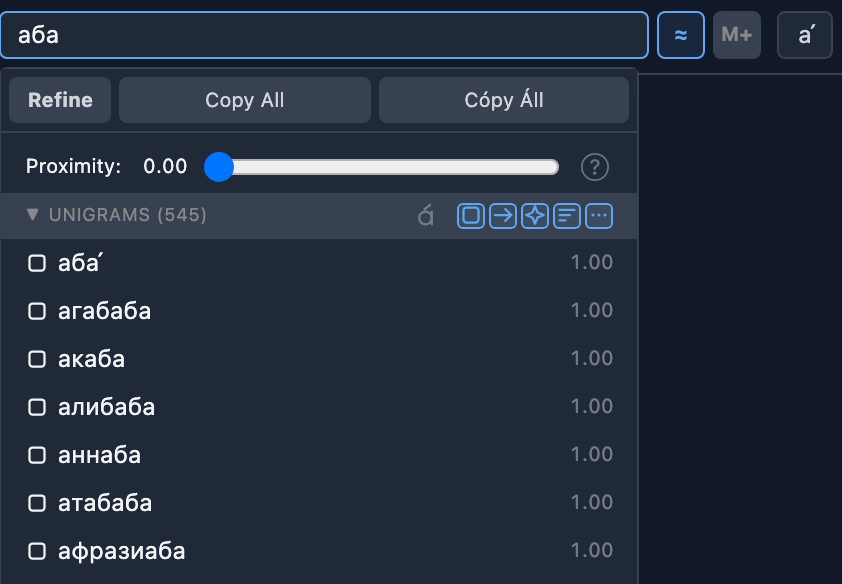
It wakes up when your search carries a stress mark
A stress mark is the accent over a vowel: аба́. Typing one is awkward on most keyboards, so the app has a button for it — , to the right of the search field.
- Put the cursor after the vowel you want and press it. That vowel takes the mark.
- Press it again and the mark comes off.
- Mark a different vowel and the mark moves — голова́ becomes голо́ва. A word only ever carries one.
- It has a keyboard shortcut, Tab unless you have changed it. The button's own tooltip tells you which: Flip vowel stress (Tab).
The same button works on the line you are writing, not only on the search field — it acts on whichever of the two you typed in last.
Until there is a mark in the search, the stress button stays greyed out and says so when you hover it: Add a stress mark to the search to use this. It is not broken and it is not hiding anything; there is simply no syllable for it to match against yet.
The mark on its own already narrows the list
Before you touch the button, the mark has done some work. Searching аба returns 545 words; searching аба́ returns 150. The 395 that left are the ones the dictionaries stress somewhere else — жа́ба, шта́ба, кра́ба — and they left because you said the voice lands on the last syllable and the dictionaries say it does not.
What stays behind is two different kinds of word:
- Words the dictionaries do stress there, printed with the mark: раба́, труба́, слаба́.
- Words no dictionary records a stress for, printed plain: генштаба, акаба, пенджаба. The app will not put a mark on a word it cannot vouch for, so a bare row is the honest answer to "where is it stressed?" — nobody knows.
That second group is why the button exists.
What unpressing it does
The button starts out pressed, and pressed means here what it means on the five buttons beside it: these words are shown. Pressed, it takes nothing out of the list — the 150 above are all there.
Unpress it and the bare rows go. The count on that same search falls from 150 to 33, and every word left carries the mark.
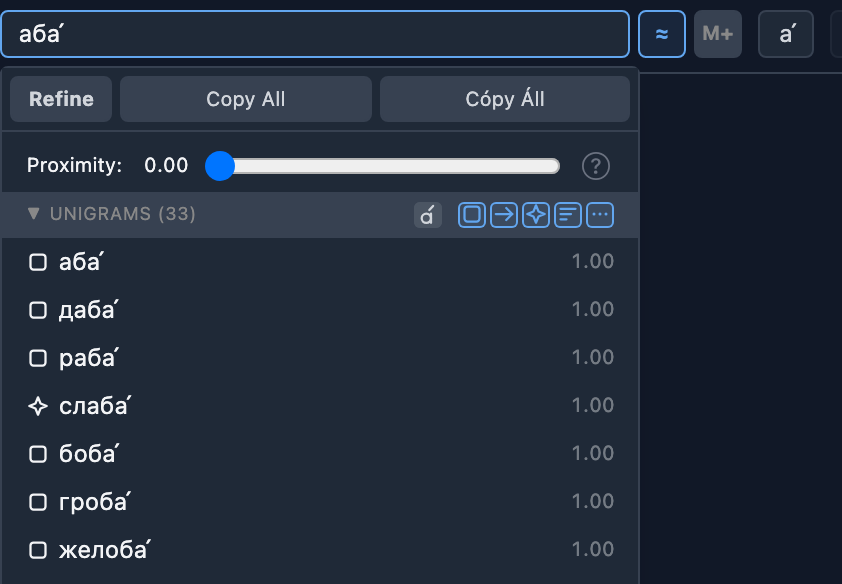
So the two states answer two different questions, and it is worth being blunt about which is which:
- Pressed asks "could this be stressed here?" A word nobody has recorded a stress for is kept, because nothing rules it out. Only a word whose known stress contradicts your mark is hidden.
- Unpressed asks "is this stressed here?" Only the words the dictionaries actually stress there survive. Nothing is on screen on a maybe.
Neither is the right one. Pressed is the wider net and throws nothing away for want of a dictionary entry; unpressed is the certain one, and it is much shorter.
The button comes up pressed on every new search. A filter you set for one word never follows you silently into the next.
Refined results have no stress button
Turn Refine on and the button is gone — the refined Unigrams header keeps its five part-of-speech buttons and nothing else. That is deliberate.
Refine replaces every Proximity score with how often the word occurs in real writing, and it gets those numbers from a frequency corpus that counts words and nothing else. The corpus does not record where anyone's voice lands. Filtering refined results by stress would mean making the stress up first, and we do not invent stress we do not have.
What the filter does to the refined list
Unpress the stress button and the refined list gets shorter — shorter than the same search refined with the button left alone.
That is not a second filter running afterwards. The words the filter removed are never asked about in the first place: the app sends only the surviving words to the server, so the answer that comes back is about those words alone. Unpress it after refining and the app asks the smaller question again rather than reusing the old answer.
This is the one filter in the panel that works this way. The part-of-speech buttons and the Proximity slider never change what is asked for — they sort out what came back.
Next
Part of speech — the icons on your rhymes, and filtering by them covers the five buttons standing next to this one in the same header.
Rhyme refinement against Corpus is what Refine does with the list once the stress filter has decided what is in it.
Rhyme search and the Proximity score says where the results came from and how closely each one rhymes.
Or just try it: open the realyrics editor, search for a word, press , and watch the greyed-out button light up.
More guides in this library
The rest of the site
The guides here describe the editor. These pages show what comes out of it, and what the team writes about the craft itself.
This guide in other languages: Русский Українська