Part of speech — the icons on your rhymes, and filtering by them
Every word in the Unigrams list arrives with one or more small icons in front of it. They say what kind of word it is: a thing, an action, a description. The same five icons sit above the list as buttons, and those decide which kinds of word you see at all.
That is the difference between reading twenty rhymes and reading the four verbs among them.
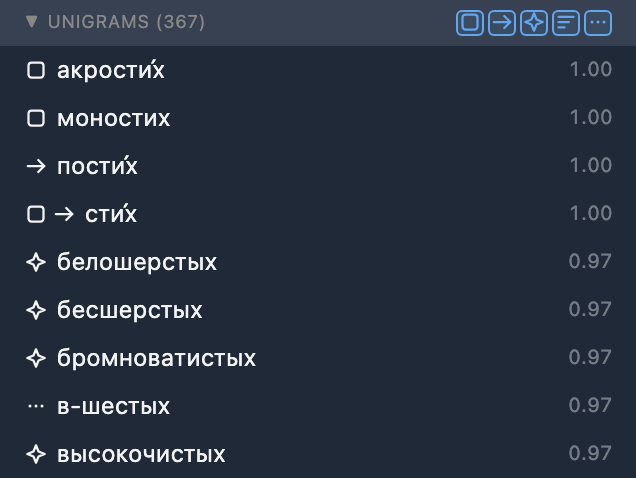
The five icons
- Noun — a person, place or thing.
- Verb — an action or state.
- Adjective — describes a person or thing.
- Adverb — describes an action or quality.
- Other — pronouns, numbers and other short words, or part of speech unknown.
Hover any icon in the list and it says the same thing in a tooltip.
The five are told apart by shape alone — a box, an arrow, a sparkle, stacked bars, three dots — and never by colour, so nothing here depends on your being able to separate two similar shades.
Every result carries at least one icon. When the dictionaries do not know what kind of word it is, it gets : no row is ever left bare, so a row with no icon means something is broken, not something is unknown.
Why one word can carry two icons
Two icons is correct, not a bug. A word can honestly belong to two kinds at once, and the list shows both rather than picking a winner.
- стих is a thing — a verse — and an action: ветер стих, the wind dropped. So it comes back as .
- быстрее describes a thing and describes an action equally well — машина быстрее, a faster car; спел быстрее, sang faster — so it comes back as .
The second case is the common one, and it is worth knowing that it is deliberate: a word of that shape genuinely reads both ways, and the app has no way of telling which one you meant. It offers you both.
Filtering by kind of word
The same five icons sit in the Unigrams header, to the right of its name and its count, as five small toggle buttons.
- Pressed means that kind is shown. All five start pressed, so by default you see everything.
- Unpress one and those words leave. Unpress and every verb goes; press it again and they are back. Nothing is lost: the filter looks at every result your search found, not only the rows in front of you, so unpressing a category can also bring in matching words you had not got to yet.
- A word with two kinds stays as long as one of them is still pressed. Unpress and стих does not vanish: it is a verb too, and is still pressed. What changes is its icons — it now shows only , the one that let it through, so you can always see why a row is on screen.
- Hover a button and it tells you what the click will do — Hide nouns while it is pressed, Show nouns while it is not.
Pressed and unpressed are readable without colour too: a pressed button is full strength and sits in a small chip, an unpressed one fades out.
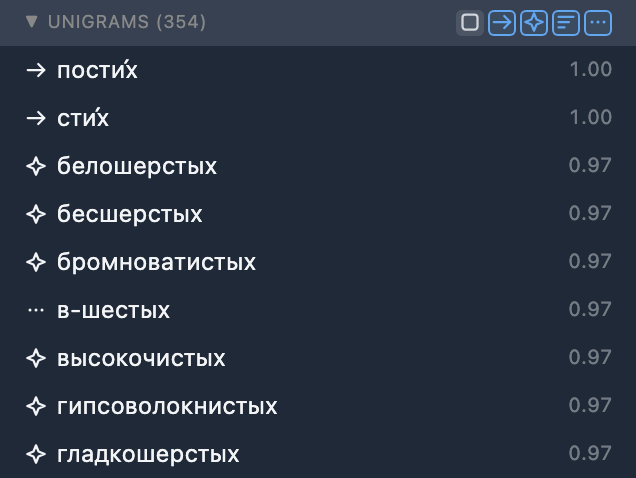
The count follows what you can see
The number in brackets beside Unigrams is how many results are displayed, not how many were found. It drops as you unpress buttons and climbs back as you press them again.
The list shows at most a thousand rows at a time, purely so the panel stays quick. When more than that got through the filter, more loads the next batch of them — so the words past the thousandth are waiting their turn, not missing.
The buttons reset on every new search
Search a new word and all five come back pressed. A filter you set for one word never follows you silently into the next one, so a fresh search always shows you everything it found.
Refine and the filters
The buttons behave exactly the same on refined results as on raw ones. There is one set of five, and whatever you have pressed stays pressed as you turn Refine on and off.
Filtering a refined list is free. Refine asks our server how common each word is; the filter asks nobody. It is applied in your browser, across everything the refine brought back, so unpressing an icon after refining costs no new request and takes no time at all — and pressing it back does not send you through the loading state again.
Next
Filtering rhymes by stress is the sixth button in this same header — the one standing a little apart from these five, greyed out until your search carries a stress mark.
The icons say what kind of word it is. Rhyme search and the Proximity score says how closely it rhymes, and where the results came from in the first place.
Rhyme refinement against Corpus is the other control at the top of the same panel: Refine swaps every Proximity score for how often the word actually occurs in real writing.
The syllable grid is where the word you picked has to land on a beat.
Or just try it: open the realyrics editor, search for a rhyme, and unpress an icon.
More guides in this library
The rest of the site
The guides here describe the editor. These pages show what comes out of it, and what the team writes about the craft itself.
This guide in other languages: Русский Українська